TOAST
AI academic planning assistant
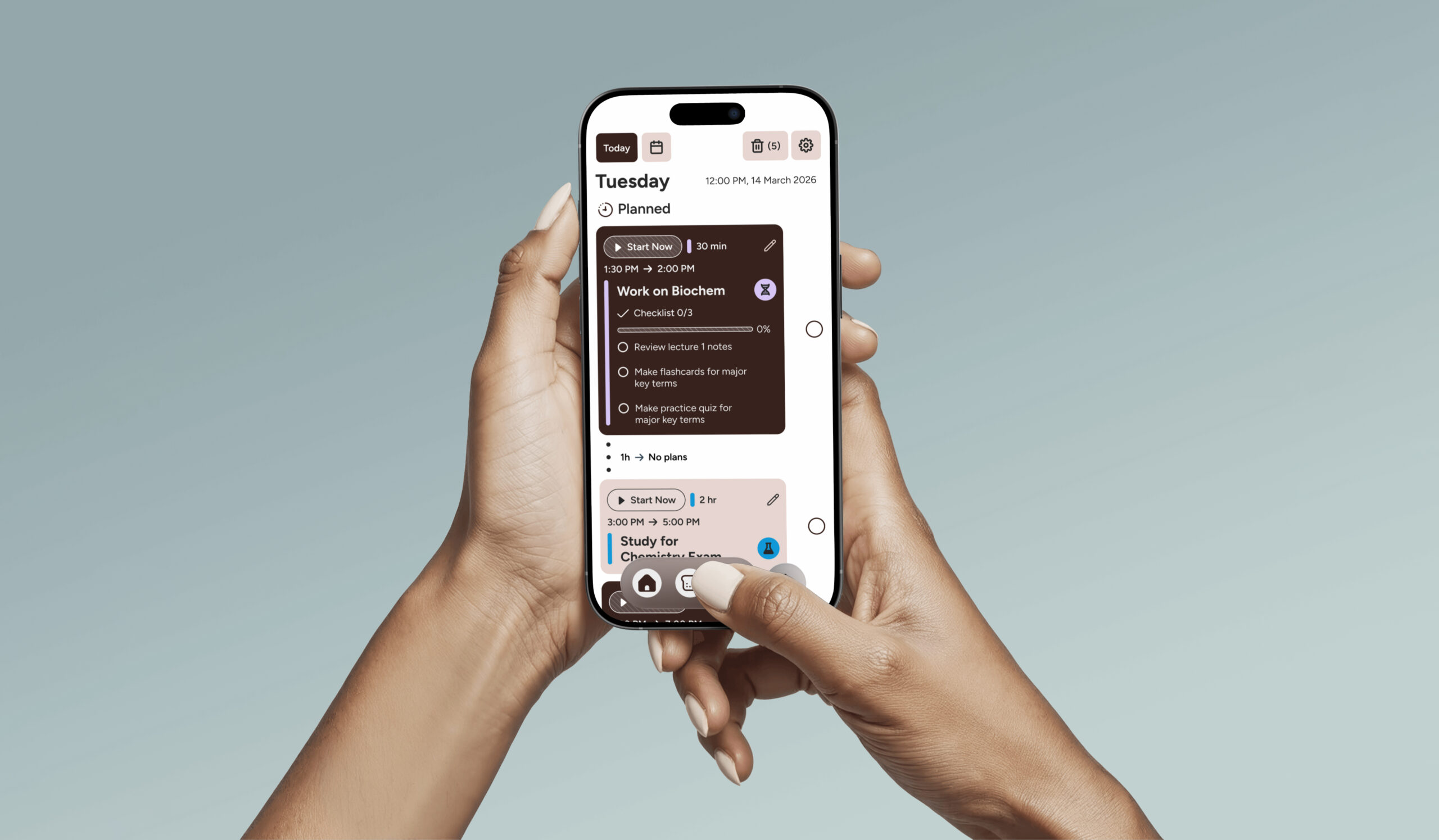
TOAST is a conceptual AI academic planning assistant designed to help undergraduate students organize coursework, break assignments into manageable tasks, and build realistic schedules.
Role
Lead Designer, Project Manager
Timeline
2 months (2026)
Team
1 researcher, 2 designers
Tools
Figma, FigJam
The challenge: helping students plan without creating dependency
Problem
Undergraduate students often manage overlapping assignments, deadlines, classes, jobs, and personal responsibilities. The challenge is not only remembering what needs to get done, but knowing where to start, what to prioritize, and how to make a realistic plan.
Because this project involved AI, the solution also had to avoid becoming overly companion-like or intrusive. TOAST needed to support academic structure and accountability while maintaining clear emotional and cognitive boundaries.
What research pointed us to
Research signals
Our team worked from a professor-provided interview dataset with undergraduate students, graduate students, and faculty about AI companions. We used the research to identify patterns around academic stress, productivity habits, attitudes toward AI, and privacy concerns. Instead of designing a general AI companion, the research pushed us toward a more bounded academic planning tool: one focused on structure, task management, and practical support.
Insight
Design response
Students needed help knowing where to start
TOAST focused on structured task lists, checklists, time blocks, and weekly planning.
AI was trusted most as a practical tool
TOAST was framed as a task-first assistant, not an emotional companion.
Support already existed outside the product
TOAST focused on academic structure rather than replacing friends, family, journaling, or breaks.
Privacy had to be part of the experience
Document upload and AI support needed to be framed around consent, data minimization, and clear communication.
Competitive analysis
I reviewed popular student planning and productivity apps, especially ones that also incorporated AI, to identify common patterns, gaps, and opportunities.
Google Calendar
Great for scheduling, but lacks study focus and task context.
Notion
Flexible, but heavy for quick daily planning.
Todoist
Strong task management, but less tailored for students.
Opportunity:
A simpler, student-first planner that knows context with study tools.
My role
What I owned
As lead designer and project manager, I organized the project timeline, assigned tasks across the team, created the competitive analysis, and led the design direction for key planning flows. I personally designed the screens: Home, Weekly View, Add Task, Edit Task, Work with TOAST, Documents, and Documents Part 2.
Project management
Organized timeline, deliverables, and task ownership. Followed design thinking practices.
Design direction, UI/UX
Helped keep the product focused on academic planning and bounded AI support.
Information archictecture
Created user flows, designed task and schedule structure.
How does TOAST work?
How TOAST turns coursework into a plan
Students can upload documents like syllabi, rubrics, and assignments, or manually add tasks with dates, times, durations, checklist items, and notes. From there, TOAST helps students turn scattered academic work into a structured daily or weekly plan.

Student upload materials

TOAST identify tasks

TOAST create/Student edit tasks

TOAST plans day/week

Ask TOAST for academic support

Student can review & adjust
Product strategy
AI boundaries
TOAST’s strategy centers on reducing the friction between knowing work exists and knowing what to do next.
TOAST should
TOAST should not
Help students break down assignments.
Act like a therapist.
Suggest time blocks and reminders.
Make final decisions without review.
Organize documents into planning context.
Hide how uploaded information is used.
Provide practical academic guidance.
Replace critical thinking.
Keep students in control.
Encourage emotional dependency.
Key flow sections
Screens
These screens are not representative of the entire project, only what I've personally designed.
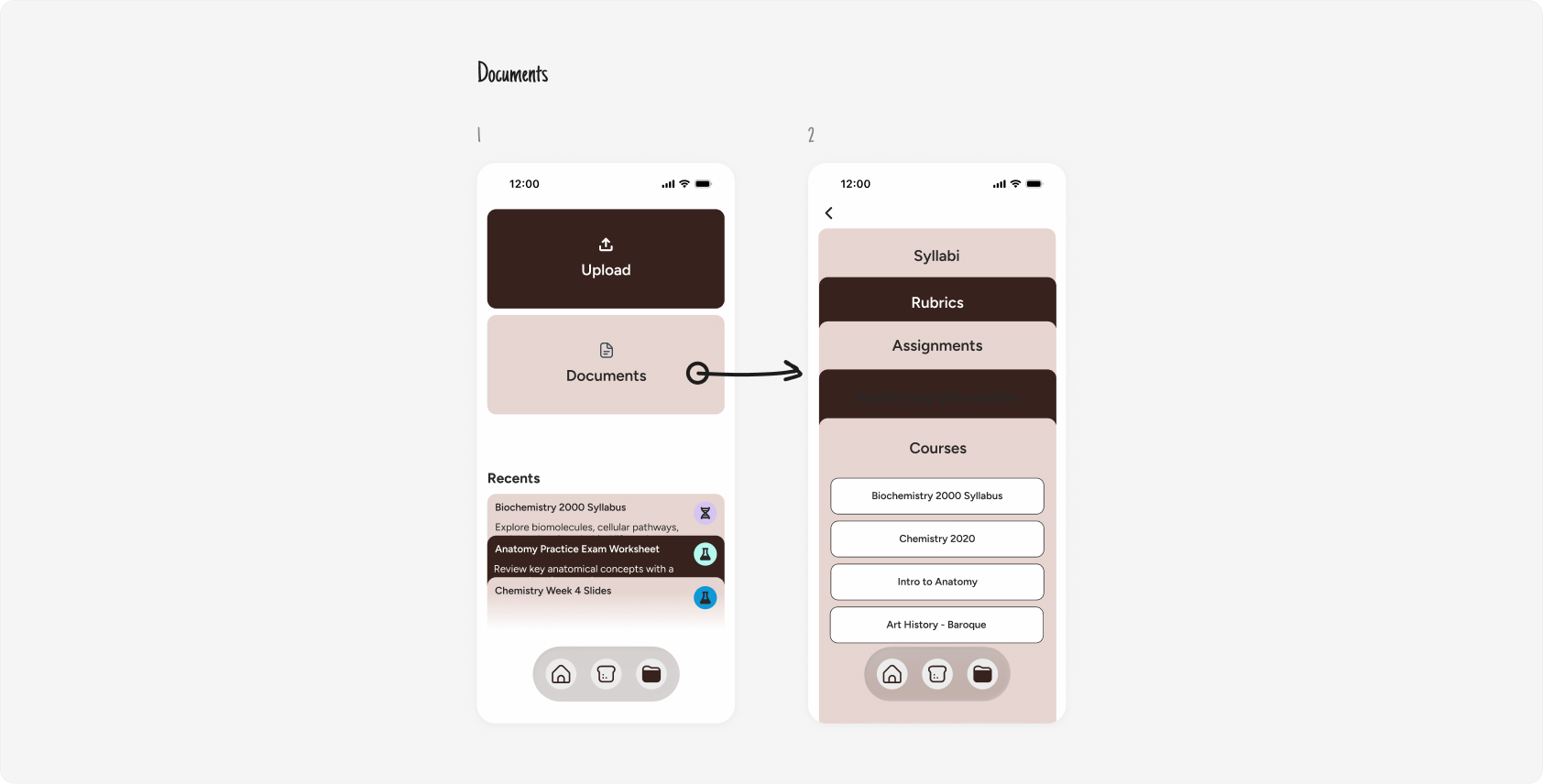
Documents to planning
Students could upload syllabi, rubrics, assignments, and course materials so TOAST could help translate academic requirements into planning inputs.
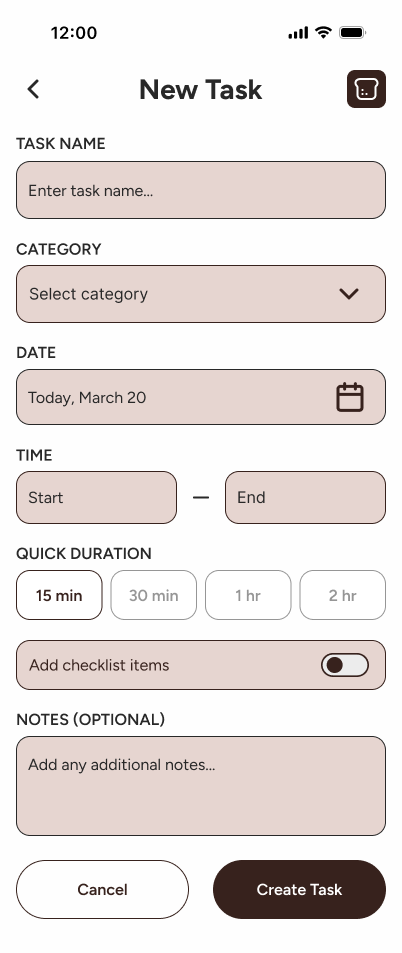
Creating and editing tasks
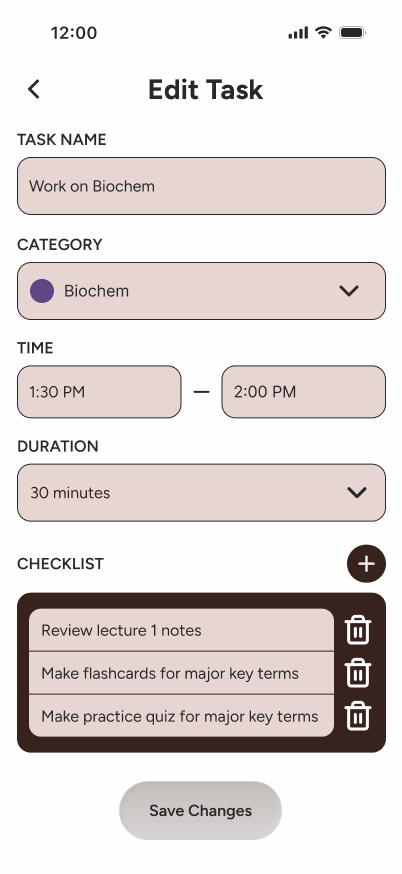
The task flow helps students turn vague academic work into specific actions by defining course category, time, duration, checklist items, and notes.
New task
Edit task
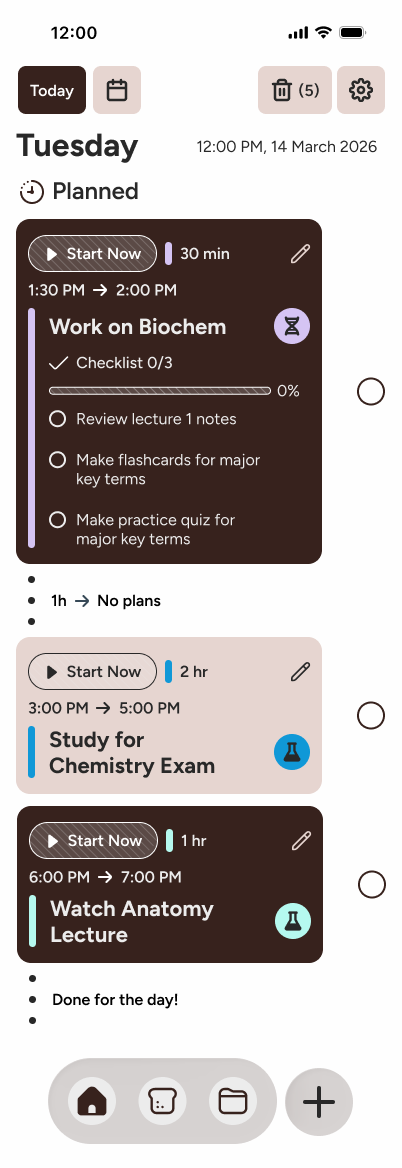
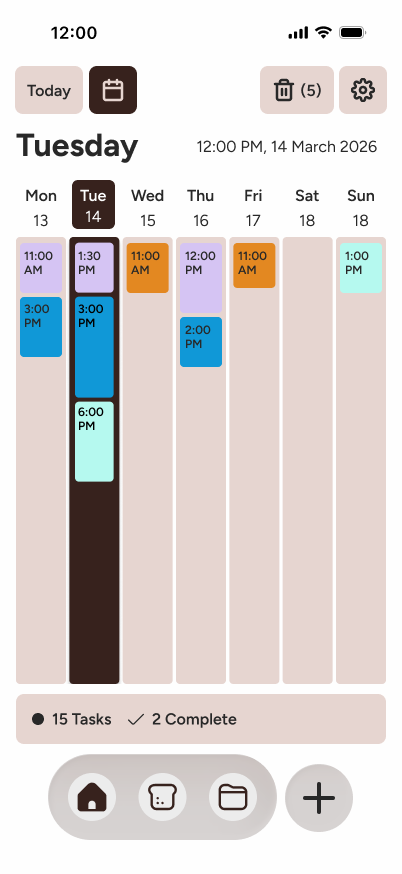
Daily and weekly planning
The daily view helps students decide what to do next, while the weekly view helps them understand how their workload is distributed over time.
Daily view
Weekly view
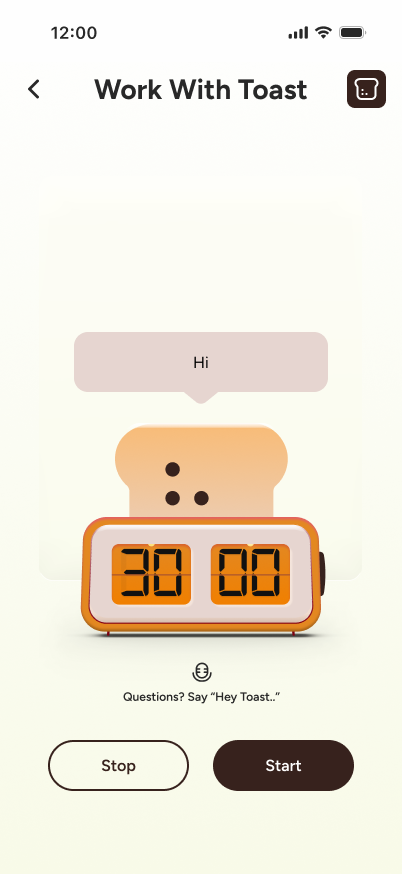
Work with TOAST
The assistant entry point gave students a place to ask academic planning questions, but the product strategy kept TOAST focused on practical support rather than emotional companionship.
Work with TOAST
Testing revealed where the interaction was too hidden
Usability testing / iteration
Method
Remote moderated
Users
4 students/recent graduates
Prototype
Lo-fi interactive prototype
Length
~10 minutes each
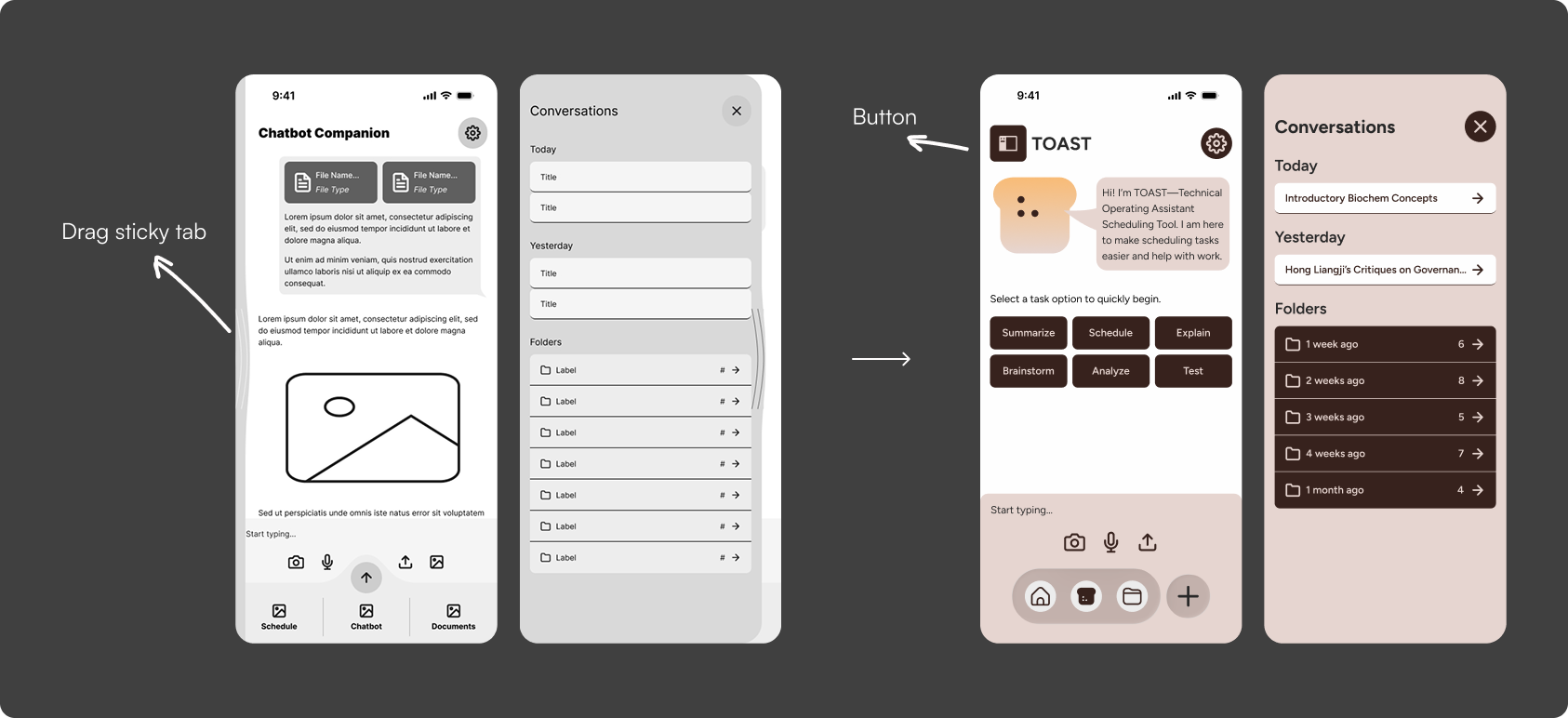
The strongest usability issue was the sticky pullout tab. Several users either missed it, did not understand that it could be dragged, or only discovered it after being prompted. While the interaction was intended to create quick access to a hidden menu, testing showed that the affordance was too subtle.
After testing, I advocated for changing the hidden pullout interaction into a clearer button-based entry point. The goal was not to remove the original drag interaction completely, but to make the menu easier to discover while preserving the intended gesture as a secondary interaction.
Finding
Users missed or misunderstood the sticky pullout tab.
Decision
The team changed the hidden drag interaction into a clearer button affordance.
Why
Planning tools should reduce friction, not require users to discover hidden navigation.
What I learned leading a process-heavy AI project
Reflection
Design systems need to come earlier in team projects
If I continued the project, I would establish shared components, typography system, spacing, and interaction rules earlier so the final prototype felt more visually unified.
Responsible AI needs to be visible in the interface
There is no screen explaining why TOAST prioritized a task. A future version should show why TOAST prioritizes certain tasks, such as deadline, estimated effort, available time, or course importance. This would make AI-generated planning more transparent and easier for users to trust or edit.
Leadership means balancing vision and compromise
Leading the design direction taught me how to balance different visual opinions, assign work based on team strengths, and keep TOAST focused on how we can help students.
Fin.